Quickstart
From pip install to a tracked call in your dashboard — about five minutes.
Install the SDK
pip install solwynPython 3.11+. The SDK ships py.typed. Optional extras (e.g. solwyn[openai]) pin tested provider-SDK
floors and are listed in the configuration reference.
Get your Solwyn API key
You need a Solwyn API key (sk_proj_…). It's created in the dashboard the first time you make a project —
and shown exactly once.
- Sign up at app.solwyn.ai and verify your email with the 6-digit code.
- The onboarding wizard creates your first project — name, budget, and enforcement mode in one form.
- The key is shown once at creation. Copy it then — it's masked everywhere after.
Full walkthrough with screenshots: Get your API key.
export SOLWYN_API_KEY=sk_proj_...The SDK reads SOLWYN_API_KEY automatically.
Wrap your client
import os
from openai import OpenAI
from solwyn import Solwyn

client = Solwyn(
    OpenAI(),                                  # OPENAI_API_KEY from env
    api_key=os.environ["SOLWYN_API_KEY"],
)
response = client.chat.completions.create(
    model="gpt-4o",
    messages=[{"role": "user", "content": "Hello from Solwyn!"}],
)
print(response.choices[0].message.content)
client.close()
import os
from anthropic import Anthropic
from solwyn import Solwyn
client = Solwyn(
Anthropic(),
api_key=os.environ["SOLWYN_API_KEY"],
)
response = client.messages.create(
model="claude-sonnet-4-5",
max_tokens=1024,
messages=[{"role": "user", "content": "Hello from Solwyn!"}],
)
print(response.content[0].text)
client.close()import os
from google import genai
from solwyn import Solwyn
gc = genai.Client(api_key=os.environ["GEMINI_API_KEY"])
client = Solwyn(
gc,
api_key=os.environ["SOLWYN_API_KEY"],
)
response = client.models.generate_content(
model="gemini-2.0-flash",
contents="Hello from Solwyn!",
)
print(response.text)
client.close()import os
import boto3
from solwyn import Solwyn
bedrock = boto3.client("bedrock-runtime", region_name="us-east-1")
client = Solwyn(
bedrock,
api_key=os.environ["SOLWYN_API_KEY"],
)
response = client.converse(
modelId="us.anthropic.claude-3-5-sonnet-20241022-v2:0",
messages=[{"role": "user", "content": [{"text": "Hello from Solwyn!"}]}],
inferenceConfig={"maxTokens": 1024},
)
print(response["output"]["message"]["content"][0]["text"])
client.close()import os
from openai import OpenAI
from solwyn import Solwyn
client = Solwyn(
OpenAI(base_url="https://api.groq.com/openai/v1", api_key=os.environ["GROQ_API_KEY"]),
api_key=os.environ["SOLWYN_API_KEY"],
)
response = client.chat.completions.create(
model="llama-3.3-70b-versatile",
messages=[{"role": "user", "content": "Hello from Solwyn!"}],
)
print(response.choices[0].message.content)
client.close()Non-default-port or ambiguous endpoint? Name it: Solwyn(OpenAI(base_url=...), api_key=..., provider="vllm") — see OpenAI-compatible providers.
Solwyn reads token counts from the response — never your prompts or completions.
Your existing call signature is unchanged; client.close() flushes the final usage report.
Using asyncio? AsyncSolwyn mirrors the same surface — see Async usage.
See it in the dashboard
Within seconds, the call appears in your dashboard as a cost event — token breakdown, model, and cost attributed to your project.
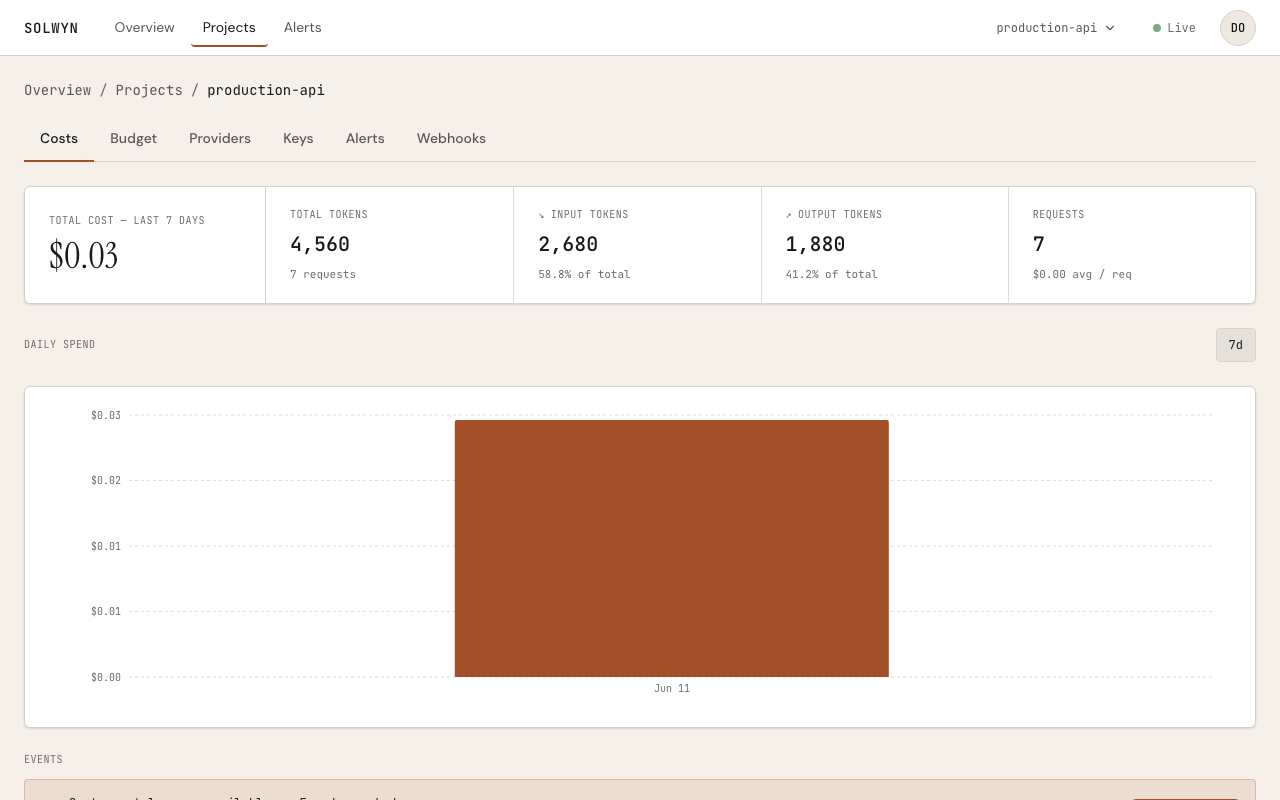
A default alert at 100% of your budget is already armed — you're covered without configuring anything. On the Free tier enforcement is alert-only: calls are never blocked. Every tier can hard-deny, with one hard-cap project on Free.
Beyond chat: the OpenAI Responses API, embeddings, images, audio, and video calls are tracked through the same wrapper — see Surface coverage.
Next steps
Set a budget
Alert-only vs hard-deny, and what happens at the limit.
Add provider failover
Automatic cross-provider retry with translation, and cost-aware routing.
Attribute cost per agent
solwyn.run() scopes spend to a named agent run, with tags and nesting.
Stop a runaway run
An operator stop from the dashboard, or local velocity detection.
Test your enforcement
Script denials, outages, and kills with the zero-network double.
Plug into a framework
OpenAI Agents, LangChain and LangGraph, CrewAI.
How privacy works
The exact wire contract — what is and isn't transmitted.